 InStep instependpoint.com
Inventory & overview
Hardware, software, battery and performance score of every device – and fleet search answers “Where is this installed?” in seconds.
admin@notebook-01:~$ instep-agent status
InStep is the admin center for your Linux machines: enroll devices, keep inventory and updates in view, deploy apps and help users remotely – self-hosted, with an agent that never runs as root.
In active development, in test operation on our own devices with Arch, Ubuntu and Fedora. No obligation. Remote help and LAPS are available only on Arch-based systems today.
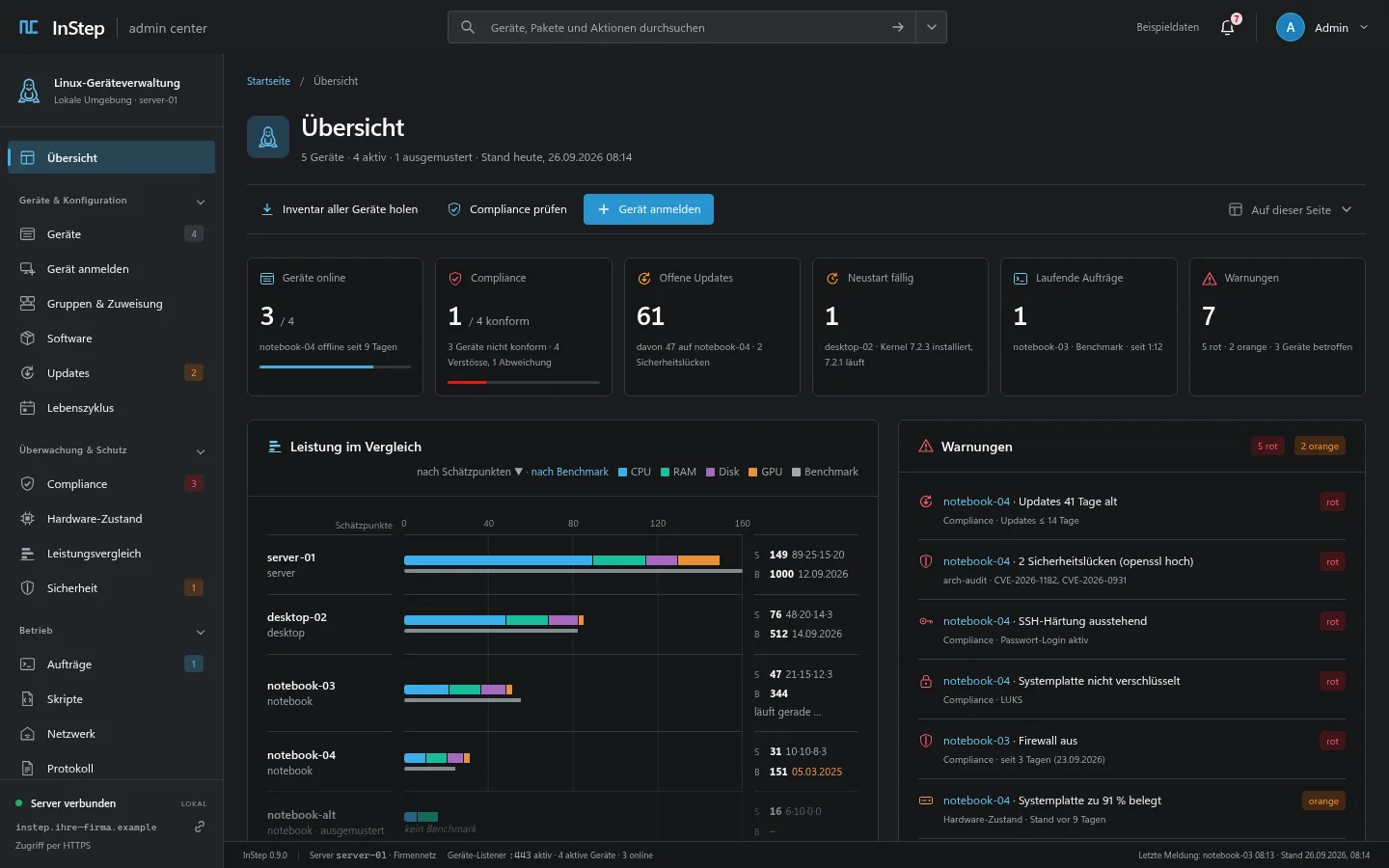
Design draft of the portal with sample data – it shows the target picture, including planned features. The portal itself is shown in German.
Which machines are running, with what hardware, which kernel, which packages? Usually the answer lives in a spreadsheet that is never up to date.
Updates run through an SSH loop or not at all – and nobody knows which machine has been waiting for a reboot for weeks.
Many management products think of Windows and smartphones first. Linux gets a fraction of the features, and your device data sits in someone else's cloud.
InStep turns this around: built for Linux, run on your server. A lean agent reports inventory and state. You control updates, apps and remote jobs from one portal – and every action is signed, logged and visible on the device.
Built and in test operation: 33 features on Arch-based systems, 25 on Ubuntu/Debian, 14 on Fedora (in testing). Here are the six areas at a glance.
Hardware, software, battery and performance score of every device – and fleet search answers “Where is this installed?” in seconds.
Check pending updates, roll out system and Flatpak updates as a job, follow them live and see which reboots are due.
AppImages and Flatpaks per group – required, or optional through the tray. InStep repairs missing dependencies itself.
Terminal and screen in the browser, reboot and shutdown (also scheduled), rename, Wake-on-LAN. Terminal, screen and Wake-on-LAN are available only on Arch-based systems today.
A complete audit log everywhere. Rules as a device × rule matrix and LAPS for Linux on Arch-based systems today.
LiveView every second with sensors, plus reproducible benchmarks – on Arch-based systems today.
What works on Ubuntu/Debian today: enrollment, inventory, system updates, own apps, self-healing, reboot and rename. On Fedora (in testing): enrollment, inventory and agent updates. The “Features per distribution” matrix shows exactly which.
Clear navigation, key-figure tiles, data grids and detail pages with tabs – familiar to anyone who has used a cloud admin center. Plus KDE Breeze colors and both light and dark mode.


All images come from the portal design draft and show sample data. The portal as built follows this design; individual elements shown are not implemented yet or are named differently in the product. The portal interface is in German.
No copying of certificates or keys by hand: the installer ZIP comes from your own InStep server and carries everything the device needs for a secure connection. The server itself only needs a Linux host with Podman or Docker Compose: one container and one volume.
On the new device, open “Enroll device” in the portal and download the installer ZIP. Checksum and certificate fingerprint are shown next to it.
Run instep-installieren.sh: it installs the package with pacman, apt or dnf and asks for the one-time code from the portal.
Within a minute the device shows up under “Devices” – with inventory, online status and agent version.
# For advanced users: install the package directly
admin@notebook-01:~$ sudo pacman -U instep-agent-<version>-1-x86_64.pkg.tar.zst
Loading packages …
(1/1) installing instep-agent        [######################] 100%

admin@notebook-01:~$ sudo instep-agent setup
InStep setup
Enter the enrollment code from the web portal (Enroll device): K7QM-4XRT
Done. 'notebook-01' is enrolled, the InStep agent is running.
The device shows up under 'Devices' within a minute.
instep-installieren.sh, enter the code.If you distribute software to every company machine, you need an agent you can trust. InStep keeps privileges small and verifies everything that comes from the server.
Linux workstations with inventory, updates and compliance – no cloud account, with your data on your own network. The complete compliance check is available only on Arch-based devices today.
Five machines, three distributions, one overview. InStep runs as a container next to your other services.
Keep classroom and club machines up to date, deploy apps for everyone and help right at the screen when something breaks.
Look after Linux customers without touching every device. Today one InStep instance runs per customer – tell us in your early access email what you need.
Arch Linux, CachyOS, Manjaro, EndeavourOS: the full feature set.
Ubuntu 24.04 and 26.04, Debian 13, Linux Mint 22: most features.
In testing: enrollment, inventory and agent updates; more features follow.
A Windows agent for the same portal is planned. We will only name a date once it is reliable.
Yes, with a narrower scope. According to Microsoft, Intune can enrol Linux desktops running Ubuntu Desktop 24.04/26.04 LTS and Red Hat Enterprise Linux 9/10 (as of 11 October 2026). The focus is on compliance policies and conditional access to Microsoft 365 web apps in Microsoft Edge. InStep is built for Linux from the ground up: inventory, updates, app deployment, remote access and compliance, self-hosted. Sources: Microsoft Learn, learn.microsoft.com/en-us/intune/fundamentals/platform-guide-linux and learn.microsoft.com/en-us/intune/user-help/enrollment/enroll-linux, retrieved on 11 October 2026. The fair comparison with all sources is on the “Intune alternative for Linux” page.
With InStep you install a small agent on each machine and enrol it with a one-time code. After that you see all devices in one web portal and control updates, apps and remote jobs from there.
No. The server runs as a container on your network (Podman or Compose). Devices connect outbound over HTTPS. Your device data stays with you.
A Linux host with Podman or Docker Compose: the server consists of one container and one volume for the data. No cloud account is needed. Only the small agent runs on the devices.
Arch-based distributions (Arch, CachyOS, Manjaro, EndeavourOS), Ubuntu 24.04 and 26.04, Debian 13 and Linux Mint 22. Fedora 43 and 44 Workstation are in testing. All on x86_64.
The portal interface is currently in German. This website is available in German and English.
No. The agent runs as its own user without root. Whatever needs root, such as applying updates, is done by separate system services with one fixed task each, and only after your server's signature has been verified.
Yes, on Arch-based devices. InStep sets a strong password for the local admin account on each device, transfers it end-to-end encrypted, shows it in the portal with an audit entry and rotates it after every session.
Not yet. A Windows agent is planned; we will only name a date once it is reliable. Your needs in your early access request help us prioritise.
InStep is in active development and running in test operation on our own devices with Arch, Ubuntu and Fedora. With early access (waiting list) you will be among the first to know when InStep is available; we invite selected interested parties to test it in advance.
Request early access by email and join the waiting list. You will be among the first to know when InStep is available; we invite selected interested parties to test it in advance.